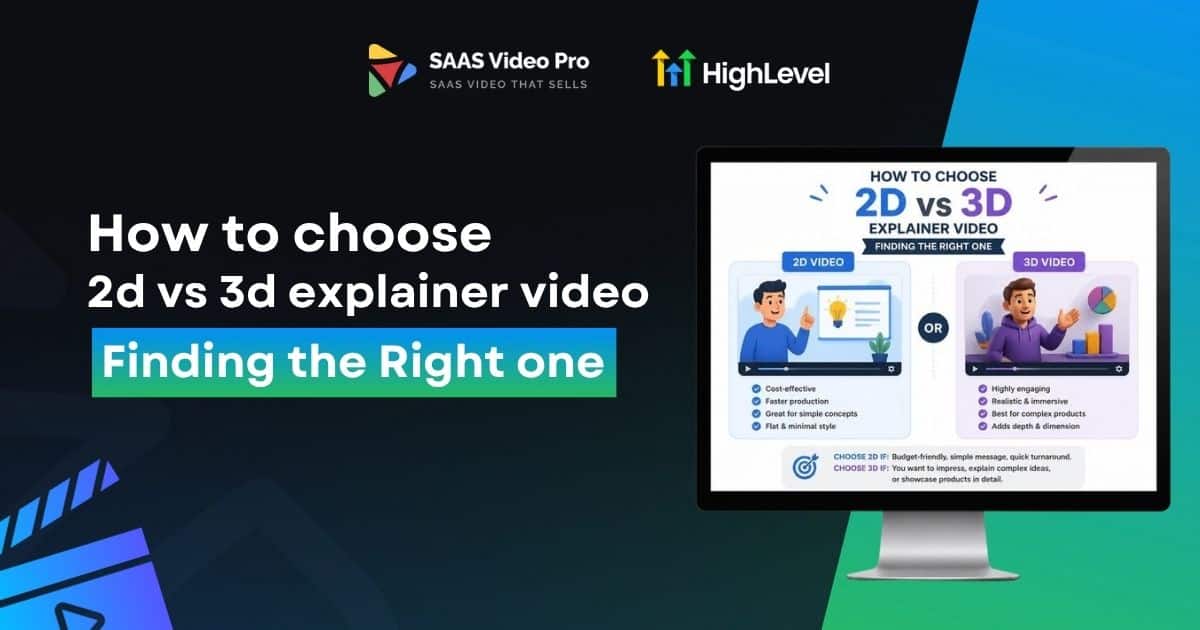
How to choose 2d vs 3d explainer video? Finding the Right one
You’re planning an explainer video, and now you’re stuck on one decision. 2D or 3D? Most people pick based on looks. Whatever seems more impressive wins. But that’s usually the wrong way to choose.
The real question isn’t which style looks better. It’s which one actually fits your product. This guide breaks down 2D vs 3D animation in plain terms, so you can pick the right explainer video style without wasting your budget.
The Myth That Wastes the Most Budget:
3D looks better, so let’s go with 3D.”
That one line has cost brands more money than any other decision in explainer videos. It sounds logical. It’s not.
3D is a tool, not an upgrade. Use it on the wrong product, and you pay more for a video that connects less.
This one myth “3D always looks better” The result is wasted money and a video that ends up confusing people instead of explaining things clearly.
Let’s break it down.
Read this: How to Promote Your SaaS Explainer Video Across Channels?
2D and 3D, Explained Simply
2D animation moves flat. Think simple characters and icons sliding across the screen in a clean, easy way.
3D animation adds depth. Objects have shape, shadow, and weight, almost like something real sitting right in front of you.
That’s really the core difference between the two styles.
Myth #1: “2D Is Just the Cheap Option”
A lot of people assume 2D is only for low budgets, but that’s not accurate.
2D is actually the right fit for many products. The 2D model works well for software, apps, and services as it conveys ideas easily without excess visual noise.
It is not cheap, it’s just it is the right thing for the job.
Myth #2: 3D is only for the big brands.
Some people think only large companies with a big budget can afford 3D animation. It’s not like that.
If a company has a small brand with a physical product (not software), it will need 3D more than a large software company ever will.
The important thing here is that it’s a product, not a budget.
Myth #3: “Whichever Looks Cooler Wins”.
A vibrant, animated 3D video might be exciting when you are pitching or during a meeting but it doesn’t always make people feel that way in the real audience.
If your product is simple software, and you have a 3D showcase, people will not feel impressed. They will only be left ‘confused’, because they came for clarity, not a visual show.
The animation style must always reflect the message you wish to convey, not simply for convenience.
So What Actually Decides It?
It’s really just three simple questions to help with this decision every time.
Is your product a software or hardware? Digital products are typically best suited to 2D, physical products are best suited to 3D.
Who will view this video? Investors and business buyers usually want clarity fast, while casual audiences tend to respond well to visual depth.
When we say “launch,” how much time do you have? 2D animation is more easily created, and 3D is typically more time consuming to get correct.
If you are honest and answer the following 3 questions you will see the right choice will become very obvious.
2D vs 3D: Cost and Timeline some of the major differences:
When you’ve identified the style that works for your product, the next query is typically about cash and time. To know what to expect, here is a basic explanation of what you’ll be discussing before talking to any agency.
| Factor | 2D Animation | 3D Animation |
| Price Range | $3,000 – $15,000 | $10,000 – $50,000+ |
| Timeline | 4 to 6 weeks | 6 to 12 weeks |
| Best For | Apps, software, services | Physical products, medical, architecture |
| Revisions | Quick and easy | Slower, needs re-rendering |
These numbers can shift a bit depending on video length, number of characters, and how many rounds of feedback you need. But this gives you a realistic starting point before you plan your budget.
The Fastest Way to Know Which Style Fits You:
If you still have doubts, these four questions will help you get the answer.
Is it to present an idea clearly or demonstrate a product’s actual appearance and feel?
If most of your answers lean toward screen, quick, tighter budget, and explaining an idea, 2D is your style. If they lean toward a physical, longer timeline, bigger budget, and showing real detail, 3D fits better.
Read this: How to Brand an Explainer Video to Match Your SaaS ?
Why Choose One When You Can Use Both?
Here’s something most brands don’t realize until later. You don’t actually have to choose only one style.
A lot of businesses now mix both. They use 2D animation to explain the problem and introduce their idea, since it keeps things simple and easy to follow. Then they bring in a 3D render to showcase the actual product, giving viewers a real sense of its shape, texture, and quality.
This hybrid approach gives you the best of both. Clear storytelling from 2D and real visual impact from 3D, all in one video. It also tends to cost less than a full 3D production, since only certain scenes need the extra detail.
Conclusion:
2D and 3D animation both work well. The trick is knowing which one works for you.
Stop picking based on budget size or what looks flashy in a portfolio. Look at your product, your audience, and your timeline. That’s where the real answer is.
Get that part right, and your explainer video will do more than just look good. It’ll actually convert.
FAQs
Which one is cheaper, 2D or 3D?
2D is almost always cheaper. It skips the modelling and rendering work that makes 3D take longer and cost more.
What’s better for startups?
Most startups do better with 2D. It’s faster, more affordable, and easy to update as your product or message changes.
Can I switch styles halfway through the project?
It’s possible, but not ideal. Switching midway usually means restarting a big part of the work, which adds cost and delays. It’s better to decide early, based on your product and audience.
Do I need 3D if my product is physical?
Not always, but it usually helps. If people need to understand size, texture, or how something works mechanically, 3D shows that far better than flat graphics.